Herd every machine in your lab into one big AI model.
LabHerd is a Windows app that pools the PCs, graphics cards, memory and drives in your home lab, so together they run AI models too big for any one of them. Private, local, on hardware you already own.

Load any model in four steps
LabHerd is a front end for llama.cpp. It does the hard part - working out what goes where - so you don't have to.
Pick a model
Any GGUF model, dense or mixture-of-experts, one file or split into parts. LabHerd reads every part of it.
Auto place
It measures every GPU, RAM, drive and network link, plans the fastest split and shows the expected speed.
Tune
Experts per word, expert cache, context size, what stays on the drive. Or leave the defaults alone.
Run
A green READY bar shows your chat address and an OpenAI-compatible API address for your other apps.
Everything your lab needs to run big models
Pool every PC
One PC is the master, the others are helpers. Their GPUs and RAM join the master's, and each one gets the slice of the model it can hold.
Automatic planning
Auto place measures your real hardware and network, then picks the fastest layout. Drag sliders or fine-tune every layer if you want control.
Built for big MoE models
Only the experts each word needs are pulled in, and the busy ones stay on a fast "shelf". Lower experts per word for speed, with the cost shown plainly.
Network optimizer
Keeps data off the network that doesn't need to cross it. A helper with its own copy of the model reads its share locally instead of over the LAN.
Self-healing pool
If a helper drops out, the pool tries to bring it back. Helpers show what the master is doing, live.
Chat and API, ready
Open the chat in your browser, or point your apps at the OpenAI-compatible API. LabHerd tells you clearly when it's ready.
Keep older GPUs running the newest software
Good cards shouldn't be left behind just because they're a few years old. A big part of LabHerd's goal is running the newest software, like the latest ROCm (TheRock) and llama.cpp builds, on older chips such as AMD's Navi 21 generation, and pooling them with your newer cards.
We test on real older hardware in a home lab, including Radeon PRO V620 and W6800 cards working alongside NVIDIA RTX cards, so the GPUs you already own keep earning their place in your herd.
See where every part of the model goes
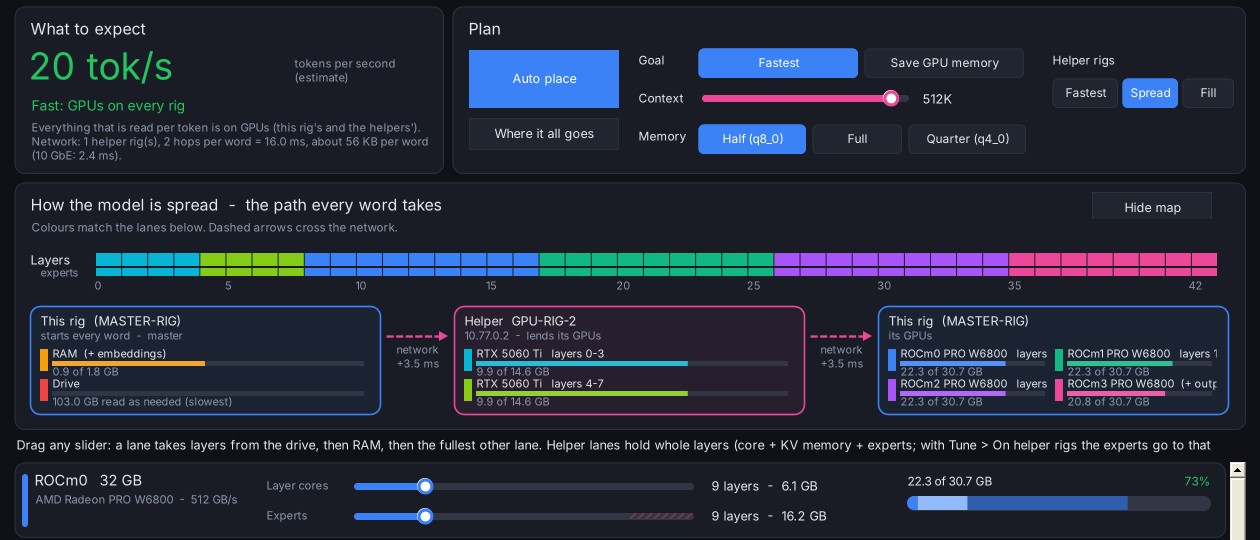
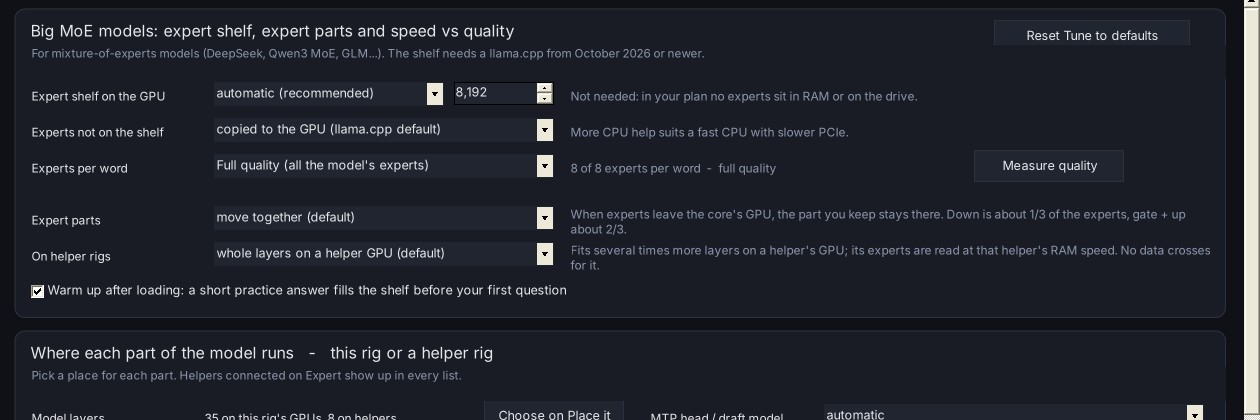
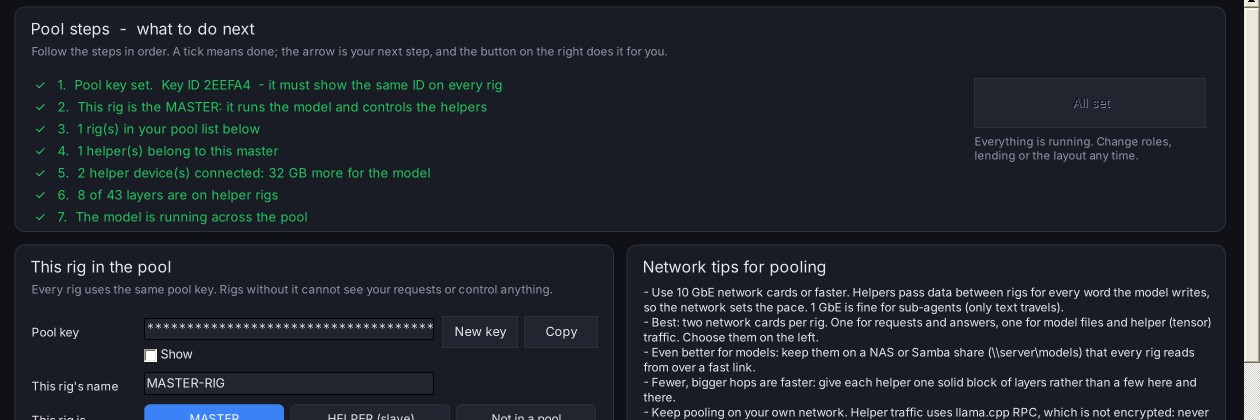

Ollama runs a model on your PC.
LabHerd herds your whole lab into one model.
Ollama is a great, easy way to run models that fit on one computer. LabHerd is for when the model is bigger than your computer: it pools the GPUs, RAM and SSDs of every PC in your home lab, and shows you exactly where every piece runs.
| LabHerd | Ollama | |
|---|---|---|
| Run a model on one PC | ✓Yes | ✓Yes |
| Split one model across several PCs | ✓Yes. HELPER PCs lend their GPUs and RAM over your network, so a model bigger than any one PC can run. | –Not built in. Several Ollama servers can share out separate requests, but each one runs the whole model. |
| Choose where each part of the model runs | ✓Drag a slider per GPU, per layer and per expert part: GPU, RAM, SSD or a helper PC. | Automatic, with a setting for how many layers go on the GPU. |
| Control MoE experts (DeepSeek, Qwen MoE, GLM...) | ✓Expert shelf on the GPU, experts per word, warm-up, big lookup tables left on the SSD. | Automatic only. |
| Mix AMD and NVIDIA cards from different PCs in one model | ✓Yes. Each PC uses its own llama.cpp build (CUDA, ROCm or Vulkan). | –Not across PCs. |
| Speed estimate before you start, live map while it runs | ✓Yes. See the expected tokens per second change as you drag, then the real speed. | –No. |
| Long context | ✓Slider up to 1M on any model. Past the length the model was trained for, LabHerd adds YaRN rope scaling for you. | Set by a number (num_ctx). |
| Check and fix split model files | ✓Finds bad part names, MTP and vision files, and fixes them. | –No. |
| OpenAI-compatible API and chat | ✓Yes | ✓Yes |
| Download models with one command | –No. You bring your own GGUF files. | ✓Yes, from the Ollama library. |
| Runs on | Windows 10/11 | Windows, Mac and Linux |
| Price | Free on one PC and as a HELPER. A monthly license runs the pool MASTER. | Free and open source |
Pick LabHerd when
the model doesn't fit on one PC, you have GPUs spread over several PCs, you run big MoE models like DeepSeek, you want older GPUs like Navi 21 cards to keep working with the newest ROCm and llama.cpp, or you want to see and control where every part of the model goes.
Pick Ollama when
the model fits on one PC, you want one command that downloads and runs it, or you're on a Mac or Linux. Plenty of people use both.
Compared with Ollama's own features as of November 2026; both change often. Ollama is a trademark of its owner. LabHerd is not affiliated with or endorsed by Ollama.
Bring your hardware. LabHerd does the herding.
- Windows 10 or 11 (64-bit)On every PC in the herd.
- A llama.cpp build for your GPUsDownload it yourself from the llama.cpp releases page: Vulkan, CUDA or ROCm. Older AMD cards (Navi 21) can use the newest ROCm (TheRock): point LabHerd at its folder on Setup.
- A GGUF modelAny size. Bigger than your VRAM is the point.
- For several PCs: the same LabHerd and llama.cpp version on eachOn the same local network. Wired is best.
Honest about speed
Speed depends completely on your setup: your GPUs, network cards and switch, RAM, drives, the model and your settings. There's no single number that would mean anything for your lab.
That's why LabHerd shows an estimate for YOUR hardware before you start, and the real speed while it runs. Splitting a model over a network costs some speed; the goal is running models that don't fit on one machine at all.
Questions
Is this for training AI models?
No. LabHerd is built for running models (inference): chatting with them and using them from your apps.
Does it work with NVIDIA and AMD cards together?
Yes. Old and new cards, AMD and NVIDIA, can all be in one herd. Each PC uses the llama.cpp build that fits its cards.
Do I need more than one PC?
No. On one PC LabHerd still splits a model across your GPUs, RAM and drive. Each PC you add gives the model more room.
Is my data private?
Yes. Everything runs on your own machines. Nothing is sent to a cloud service. Keep pooling on a network you trust, and set an API key if other devices can reach the API.
Does LabHerd install drivers or change my system?
No. It installs nothing and changes no drivers. It only starts llama.cpp with the settings it plans, and adds a firewall rule for pooling when you allow it.
Can I share LabHerd with friends?
You may share the original, unmodified LabHerd_v5.9.zip, free of charge. Your license key is yours only: don't share it. Best of all, point them to labherd.com.
Will my older AMD card work?
That's one of our goals. LabHerd is tested on older Navi 21 cards like the Radeon PRO V620 and W6800 running the newest ROCm (TheRock) and llama.cpp builds, next to newer NVIDIA cards. Any card that runs a llama.cpp build (CUDA, ROCm or Vulkan) can join the herd.
How is LabHerd different from Ollama?
Ollama runs a model on one computer. LabHerd splits one model across the GPUs, RAM and SSDs of several PCs, and lets you see and control where each part runs. See LabHerd vs Ollama above.
Is LabHerd free?
Yes, on one PC: placing models on GPUs, RAM and SSD, response settings, API mode and more. HELPER mode is free on every PC too. A monthly license unlocks the pool MASTER, the PC that runs one model across all your PCs. Cancel any time.
Start herding your lab
LabHerd 5.9 for Windows 10/11, 64-bit. One small app, no installer.
Free: everything on one PC, plus HELPER mode on every PC in your lab.
License (monthly): the pool MASTER that runs one model across all your PCs.
Already a customer? Manage or cancel your license.
Check your download: in PowerShell run Get-FileHash .\LabHerd_v5.9.zip -Algorithm SHA256 and compare it with the SHA-256 below.
SHA-256: 45315f463f2d243c63dedf52f60f7ad7cfe7681be7b86e1ed6042bc6b59ccbfd
License and legal
License
LabHerd is owned by LabHerd (labherd.com). You may install and use it on computers you own or control. You may share only the original, unmodified release zip, free of charge. You may not sell, modify or repackage it, or share license keys. Full terms: LabHerd License Agreement.
No warranty - use at your own risk
LabHerd is provided "as is", without warranty of any kind. You use it of your own free will. Running large AI models can use all of your RAM, disk and GPU power and run your hardware hot for long periods. LabHerd and its owner are not responsible for any damage to hardware, software or data, or any other loss.
Third-party software
LabHerd does not include llama.cpp, drivers or AI models. You download them yourself and follow their own licenses. LabHerd is not affiliated with or endorsed by the llama.cpp project, AMD, NVIDIA or Microsoft. All trademarks belong to their owners.